Hiring guide
How to hire a Data Studio expert who builds reports you own
If you want to hire a Data Studio expert, the hard part is not finding someone who can drag charts onto a canvas, it is finding someone who leaves you with reports you own, understand and can keep running. This guide is for marketing managers, founders and small analytics teams. It compares your three main options, lists the questions I would ask if I were on your side of the table, and shows the red flags I see when I am called in to clean up after a previous build.

Quick answer
How do I hire a Data Studio expert?
To hire a Data Studio expert, decide whether you need one person, a marketplace freelancer or an agency, then brief them with your sources, goals and the decisions the report must support. Ask who will own the reports and data sources, how credentials are set, and what documentation you get at handover.
- Choose between an independent consultant, a marketplace freelancer and an agency based on scope and ownership.
- Reports and data sources should live in your Google account, never only in the builder's.
- Ask how data source credentials are set before work starts, not after viewers see errors.
- A good handover includes documentation of calculated fields, sources, owners and refresh settings.
Should you hire a consultant, a marketplace freelancer or an agency?
Hire an independent consultant when you want one experienced person to scope, build and explain the work. Use a marketplace when the task is small and well defined. Choose an agency when you need ongoing capacity, several people or white-label reporting for your own clients.
Most of the Data Studio results you see on search are marketplace listings, which is fine for a quick template but less suited to work that touches finance data or several messy sources. The table below shows how the three options usually compare.
Price is only one part of the decision. A marketplace freelancer may be cheaper per hour, but if the report needs rebuilding six months later because nobody can read the calculated fields, the saving disappears. An agency adds project management and backup people, which you pay for whether you need them or not. An independent consultant sits in between: one accountable person, with no layers in the way.
| Factor | Independent consultant | Marketplace freelancer | Agency |
|---|---|---|---|
| Who does the work | The person you speak to | Varies, often unverified | A team, coordinated by a lead |
| Best for | Custom builds, fixes, advice | Small, clearly defined tasks | Ongoing or multi-client reporting |
| Scoping | Direct review of your data | Often based on a gig description | Formal discovery and proposal |
| Ownership risk | Low if agreed up front | Higher, reports often built in their account | Low if contract covers it |
| Speed of changes | Fast, no handoffs | Depends on availability | Depends on the queue |
| Continuity | Depends on one person | Weak | Strong, several people know the work |
What should you ask before you hire a Data Studio expert?
Ask questions that reveal how the person handles ownership, credentials, limits and handover. Someone who has built many reports will answer these quickly and specifically.
Listen for specifics. A strong answer to the quota question mentions extracts, fewer charts per page or moving GA4 data to BigQuery. A strong answer to the blend question mentions pre-joining data in a Sheet or BigQuery, because Data Studio blends allow at most 5 sources and only equality joins. Vague answers such as we will figure it out usually mean the person has not hit the problem yet.
- Whose Google account will own the reports and data sources, and when is ownership transferred?
- Will data sources use owner's credentials or viewer's credentials, and why?
- How do you handle GA4 Data API quota errors when many people open the report?
- What do you do when a blend needs more than 5 sources?
- How will you document calculated fields, CASE statements and parameters?
- Which partner connectors would you use, and who pays for them?
- How will you check that the numbers match the source platform?
- What happens if a connector breaks after handover?
What are the red flags when hiring a Data Studio freelancer?
The biggest red flag is a report built and kept in the freelancer's own Google account. If they own the data sources, every chart depends on their login. When they stop answering emails, the report stops refreshing and you cannot edit it.
The second is confusion about viewer credentials. A data source set to viewer's credentials asks every viewer to have access to the underlying GA4 property or Sheet. If nobody explains this, your CEO opens the report and sees errors instead of numbers.
A third warning sign is a quote that arrives within minutes, before anyone has looked at your data. Nobody can price a cleaning job without seeing the files, so a fast, low number usually means the cleaning has been left out and will come back later as extra hours.
- Reports and data sources stay in the builder's account with you only added as a viewer.
- No clear answer on owner's vs viewer's credentials.
- No documentation of calculated fields, so nobody can change the logic later.
- Quotes that skip data cleaning entirely when your files are clearly messy.
- Every metric pulled through a paid connector the freelancer controls.
- No check of totals against GA4, Google Ads or your source system.
- Claims of special status with Google that you cannot verify anywhere.
What does a good Data Studio handover include?
A good handover leaves you able to run, change and fix the report without the person who built it. If you cannot answer where a number comes from after handover, the job is not finished.
In my own projects, the reports, data sources and any helper Sheets or BigQuery tables sit in the client's account from the start. I add a short document and walk the team through it on a call, so the knowledge is not only in my head.
- Ownership of every report and data source transferred to your account.
- A list of sources, connectors, credential settings and refresh frequency.
- Notes on each calculated field, CASE statement, parameter and blend.
- A record of known limits, such as GA4 quotas or the 10 dimensions and 20 metrics per table on fixed-schema sources.
- Scheduled delivery set up for the people who need the report by email.
- A short walkthrough recording or call for the team who will use it.
How do you brief a Data Studio expert so the quote is accurate?
A good brief says what decisions the report must support, which sources hold the data, and who will read it. Chart preferences come last. With that, any competent expert can give you a firm quote instead of a guess.
Include a sample of your real data, especially the messiest export. If the report replaces a spreadsheet someone rebuilds every month, share that spreadsheet, because it shows the business rules hidden in its formulas.
Be honest about what already exists. If there is an old report that half works, say so and share it. Reusing a sound data source can save time, and seeing a broken one tells the expert where the traps are, such as a blend joined on the wrong key or a field that GA4 renamed.
- The audience: executives, channel managers, finance, or clients.
- The top five numbers they need and the comparisons that matter, such as month on month or actual vs forecast.
- Every source: GA4 properties, ad accounts, Search Console, Sheets, databases or BigQuery.
- Who needs edit access and who only views.
- Any deadline tied to a board meeting, a client review or a campaign launch.
How do you check a Data Studio expert's experience?
Ask to see examples of dashboards in your area and ask the person to explain one decision they made in the build. Screenshots are easy to collect, but the reasoning behind a blend, a filter or a data model is not.
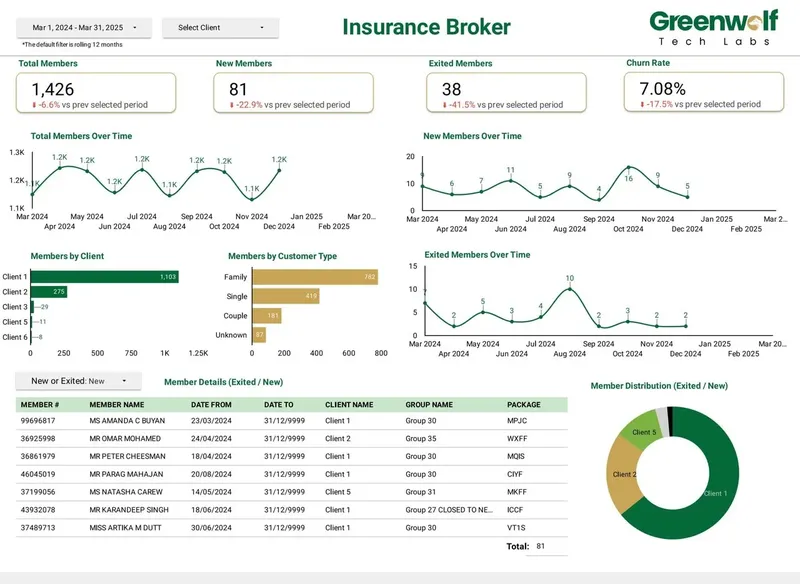
The projects I have led at Greenwolf Tech Labs include an insurance broker's membership and churn dashboard, pharma brand performance with sales and Rx volume by state, manufacturing loss analysis by machine, and logistics order tracking by stage. For one Australian insurance brokerage, automating the pipeline from messy insurer files cut report time from 4 to 5 hours to under 5 minutes, and reporting accuracy rose from about 75% to 99%.
A short paid or free review before the main project is a good way to judge someone. You see how they read your data, what questions they ask, and whether they explain things in plain language. If the review itself is confusing, the finished report probably will be too.
Does the Data Studio rename change who you should hire?
No, but it is a useful test. Google announced on April 11, 2026 that the product formerly called Looker Studio is Data Studio again, and existing reports moved over automatically. An expert who works with the product daily will know this and will not confuse Data Studio with Looker, the separate enterprise BI platform.
If someone pitches a Looker implementation when you asked for a Data Studio report, they are either confused or selling a much larger project than you need.
Case study · Insurance brokerage, Australia
From 4-5 hours of spreadsheet work to a report in under 5 minutes
A project I led at Greenwolf Tech Labs. Monthly reports were assembled by hand from inconsistent .xls files sent by several insurers. The files now land in Google Drive, are mapped into one central sheet with the business rules applied, and feed a Data Studio dashboard.
- Report time: 4-5 hours to under 5 minutes
- Reporting accuracy: about 75% to 99%
- Visibility across insurers: limited to real time, with filters
FAQ
Frequently asked questions
Where can I hire a Data Studio expert?
You can hire through marketplaces such as Upwork or Fiverr, through an agency, or directly from an independent consultant. Marketplaces suit small fixed tasks. Consultants and agencies suit custom builds, fixes and work that needs clear ownership and documentation.
Should a freelancer build Data Studio reports in my account or theirs?
In yours. Reports and data sources should be owned by your Google account so they keep working if the freelancer leaves. If they must start in their account, agree a date for transferring ownership before work begins.
What is the difference between owner's and viewer's credentials in Data Studio?
With owner's credentials, everyone who can view the report sees the data through the owner's access. With viewer's credentials, each viewer needs their own access to the underlying source. The wrong choice either exposes data too widely or shows errors to people who lack access.
How long does it take a Data Studio expert to build a dashboard?
It depends on the number of sources and how clean the data is. A single-source report is quick, while a dashboard that joins several messy spreadsheets needs cleaning and mapping first. A short review of your data gives a far better estimate than any rule of thumb.
Can I hire you directly?
Yes. You work with me directly, from the first review to handover. I quote a fixed price after a free review of your sources and goals, and the reports are built in your account.
What should a Data Studio expert hand over at the end of a project?
Ownership of every report and data source in your account, a list of sources and credential settings, and notes on calculated fields, blends and parameters. A short walkthrough for the team is also worth asking for, so more than one person understands the report.
Keep reading
Related pages
Get started
Tell me what the report has to answer
Send the question your team keeps asking and where the data lives today. I reply within one business day with how I would build it, which connectors it needs and what it would cost.
- Free 30-minute review of your data and reports
- A fixed price before any work starts
- Built in your Google account, so you own everything
Prefer email? harsh@greenwolftechlabs.com
Book a free review
Two lines is enough to start.